

How To Hack Windows 10 Admin Password
Forgot the Windows 10 admin password and non certain how to hack your way in; well, there are several ways to hack Windows 10/11 password, merely about of them expect some prerequisites from y'all to work.
Residuum like shooting fish in a barrel fifty-fifty if you practice not have any, as this guide also includes a way to hack into Windows 10 without the password reset disk and install media.

Read on to detect the all-time ways (all completely safe) to hack Windows 10 admin passwords.
Note: This article, in any manner, does non condone you lot to hack into others' laptops. Here the term hack means (un)authorized access (into ONLY your estimator.
Earlier moving forward, attempt this approach to hack into Windows 10: If you lot are using Windows 10 1803 (and later versions) and have set upwardly the security questions:
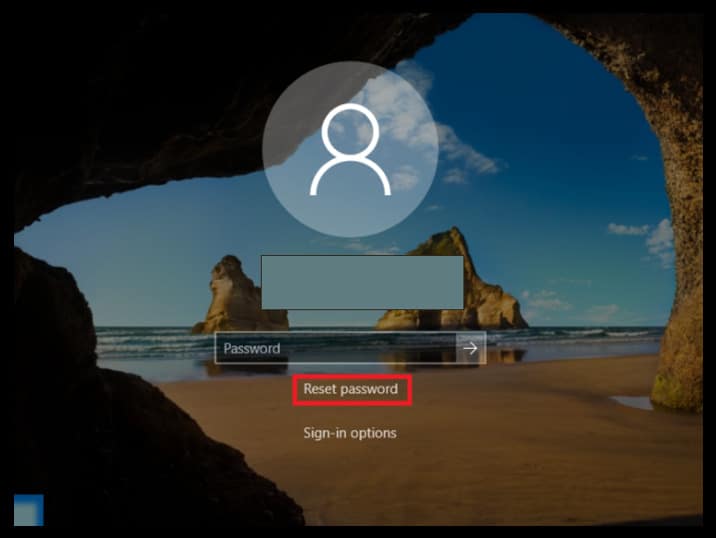
- On the lock screen, click on Reset Password.
- Type in the answers to all the security questions.
- Printing Enter.
- Type in a new password (of your choice).
- Confirm the password.
- Use the newly created countersign to log in.
Way one. Hack Windows 10/eleven Password with Password Reset Disk
Microsoft recommends only 3 methods (addressed later) to hack the password of Windows 10 (or any version), and countersign reset disk is one of them.
A password reset disk, every bit apparent, helps you to overwrite the existing password from the lock screen. That is why Microsoft recommends users create a password reset disk as before long every bit they fix upwardly the password on Windows x.
Notation: This hack only works if you have previously created a password reset disk. You cannot utilise someone else'southward deejay as the password reset tool is valid only for the user that created it. Here someone else even applies to the other users on the same computer.
If you lot exercise NOT have one, skip to the Way 3 — PassFab 4WinKey — to hack the Windows 10 countersign using a recovery tool.
*** You tin can apply the same password reset disk to hack the password of your laptop multiple times, so, even if you lot have the used reset disk — this method volition piece of work.
With that said, let' acquire how to hack Windows 10 admin password using the reset disk:
Step 1. Insert the countersign reset disk into the calculator that you want to hack.
On the lock screen, enter some characters and press Enter. Repeat this until you see the Reset password option beneath the password box.
Step 2. Click on Reset Password.
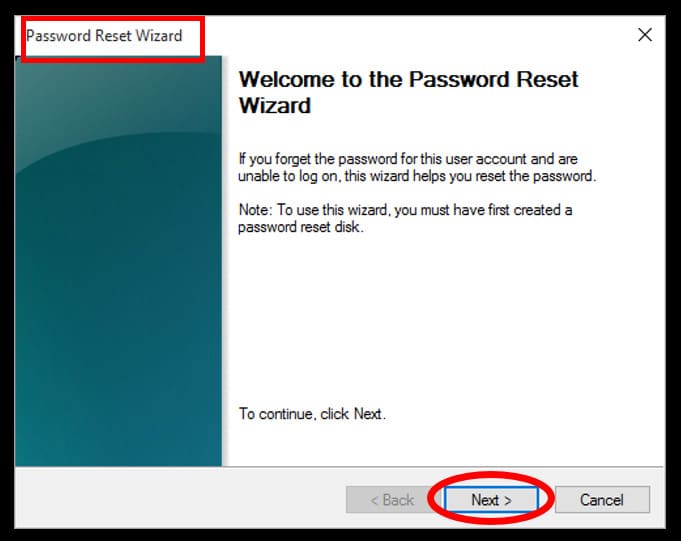
Step 3. On the Countersign Reset Sorcerer, click on Side by side.
Step 4. Click on the drop-down carte du jour toggle.
Select the name of the password reset disk inserted. Later choosing, click on Next.
Footstep 5. On the next screen, you will see three empty boxes:
- Type in the desired password (first box).
- Type in the aforementioned countersign (second box).
- Type in a password hint in the third box.
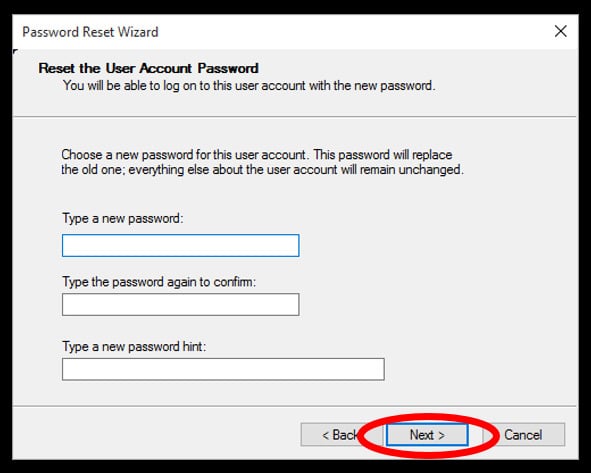
Pace 6. Click Next.
So click on Finish to save the changes.
Hacking into Windows ten will never be this straightforward, regardless of the means y'all follow. Withal, as mentioned several times, this hack is only serviceable if you have a countersign reset disk.
Way 2. Hack Windows 10/eleven Admin Password with Microsoft Account
Windows 10 (started with Windows viii) authorizes you to log in via numerous alternatives, including the choice to sign in using the Microsoft Account credentials.
Yes, the credentials of Microsoft Account, now, is known every bit a single sign-on account, meaning not but can you log in to your computer via those credentials but too sync changes across all your devices using the same sign-in information.
And, since Microsoft manages the business relationship credentials online, y'all have the option to modify it (in existent-time) and then use the new password to hack into Windows 10.
Note: Like the password reset disk, here too — you must have previously selected to allow signing in using the Microsoft Account.
Not sure whether you have enabled information technology or not?
Well, if you see an email accost (instead of your username) at the login screen to a higher place the password box — it means that you take opted to log in via Microsoft Account and can hack Windows x password using it.
Follow these simple instructions to learn how to hack into Windows 10 computer using the Microsoft Account credentials:
Step one. Visit Microsoft's Recover your Account (official) page from a different figurer or smartphone.
Alternatively, you lot can visit the Microsoft official page and click on the Forget Countersign? — link to get redirected to the Recover your business relationship page.
Pace 2. Enter either your Email address, Phone number, or Skype name linked with your Account. You tin as well use the alternative email address (but the pre-linked 1).
Afterwards entering whatsoever of the details, click on Next to proceed.
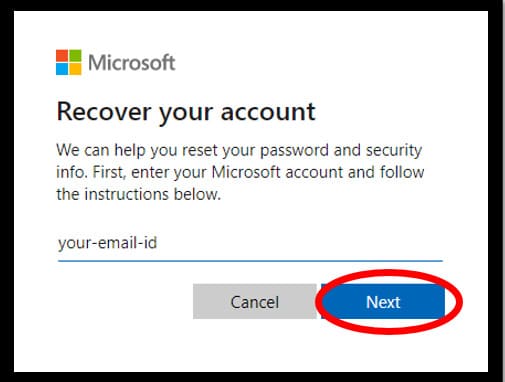
Stride 3. On the adjacent screen, Windows will display all the options, i.e., pre-linked alternative Email address, Phone numbers through which y'all tin can ostend your identity.
- Opt for a suitable and reachable option.
- In addition to that, Microsoft might enquire you for some data similar the last four digits of the linked telephone number (the last two digits will be visible. Enter the preceding two digits with the visible two digits).
- Click on Go Code afterwards completing the requirements.
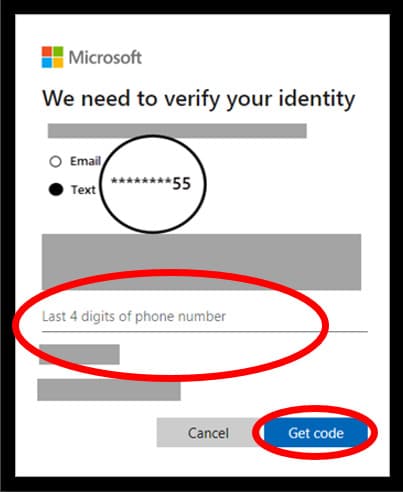
Step four. On the next screen, enter the verification code that y'all received.
Click Next to go along.
Annotation: If you lot have before opted for the 2-gene hallmark, Microsoft will ask for another confirmation code through the authenticator app — text message or tap on the mobile app.
Step 5. On the reset your password screen, enter the new password of your choice (viii characters minimum, case sensitive).
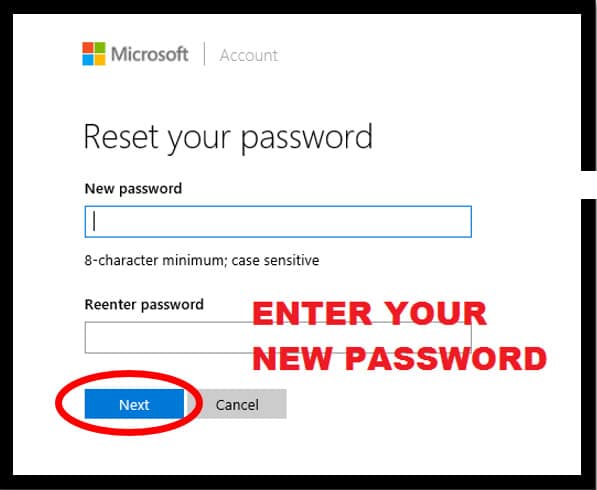
Enter the same password again in the Reenter password box. Click Next one time entered.
You volition run into the confirmation bulletin on the side by side screen saying: Your password is changed.
Note: The sign-in data of all linked services and devices volition alter in one case you reset the password. So, recollect to use the new countersign while signing in the side by side fourth dimension.
Step 6. After changing the countersign, switch on the Windows 10 laptop that you want to hack.
Type in the new password by choosing the Microsoft account icon.
Note: Ensure that the estimator or laptop has an active internet connection while signing in; if not, Windows 10 cannot access the Microsoft server and overwrite the modify.
There is no amend (or like shooting fish in a barrel) style than this process.
Notation: You tin can as well repeat the in a higher place process from the Windows 10 laptop you want to hack. Click on the I forgot my password option (beneath the countersign box on the lock screen) and follow the steps given above. There also, Windows will first ostend your identity and then allow you to create a new password.
Simply remember, this hack only works if you have opted for the Microsoft sign-in option.
Even so, rest easy if this option is not attainable to you. There are other methods listed here that tin can help yous hack the forgotten Windows 10 password.
Mode iii. Hack Windows 10/11 Password with Windows Password Recovery Software
You also accept the option to hack the Windows ten password with the help of Windows Password Recovery Software. Software like PassFab 4WinKey tin can help you to easily hack Windows x admin passwords without demanding any pre-requisites from you lot.
This arroyo will be handy for users who practise not hold any essentials, i.e., Reset Deejay, Installation Deejay, or the Microsoft account (to login with).
Follow these unproblematic steps to learn how to hack into Windows 10 using third-political party software, i.e., PassFab 4WinKey:
Go PassFab 4WinKey At present
Note: You lot will need a bootable USB device — flash bulldoze or pen bulldoze for hacking the password of Windows ten with PassFab 4Winkey.
Step ane. Become a subscription:
- Visit the PassFab 4WinKey official site and subscribe to a program that all-time suits your needs.
- Download and install the software on the other computer.
- Insert the USB bulldoze.
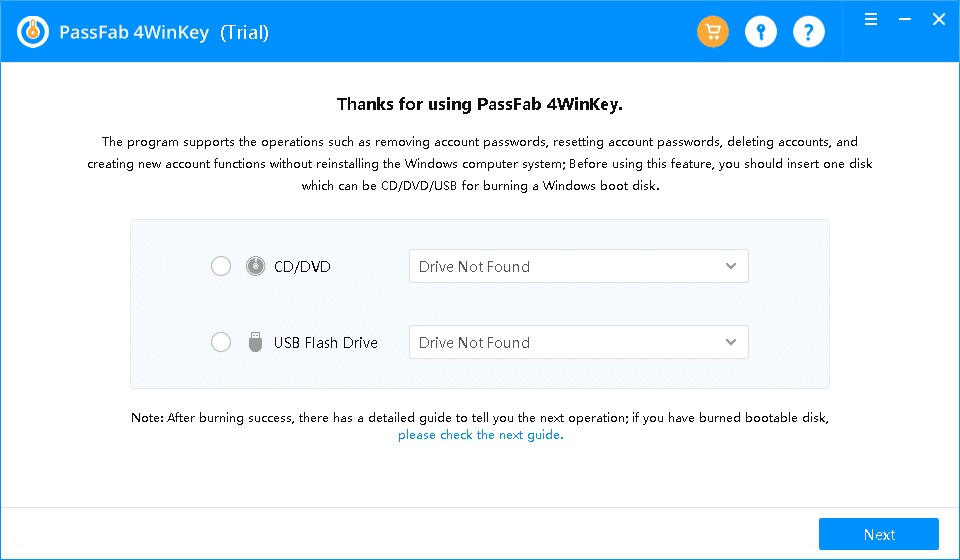
- Open PassFab 4WinKey application, and from the master interface — select the inserted USB bulldoze.
Pace 2. Burn down the inserted USB media:
- After selecting the inserted media, click on the Next option.
- Once you see the process indicator showing as 100 Percent Consummate: Eject the inserted USB media.
Step 3. Kick via the created USB wink drive:
- Now, insert the USB drive into the reckoner that you want to hack.
- Restart the computer (from the login screen), and at the restart, press — Esc, F10, F12, or F2 instantly when the manufacturer'due south logo emerges to boot the computer via the inserted drive.
Note: On near computers, either of these hot-keys — Esc, F2, F10, or F12 are standards to enter the BIOS menu. Still, depending on the computer manufacturer, the hot-keys might vary. Confirm the specific key beforehand.
Footstep 4. Customize BIOS menu options:
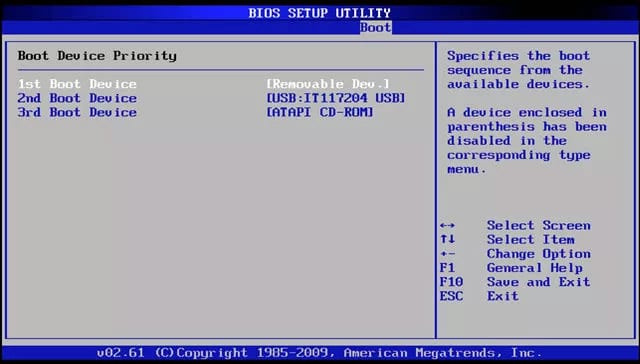
- Afterward entering the BIOS settings, navigate to the Boot options and brand the inserted USB drive every bit first priority.
- Save and Go out the changes.
- Press the Esc key to exit the BIOS menu successfully.
- Restart the computer.
Pace 5. Instead of the lock screen, the computer will prompt y'all to the PassFab interface (because y'all have opted to Kick via the inserted USB drive):
- Cull the Windows Versions, i.e., Windows 10 (edition).
- Select Adjacent to go on.
Pace vi. Hack Windows 10 countersign:
- On the new screen, select the Remove Account Password pick.
- Then, select the User Account (the local account).
- Click Adjacent after choosing both the options.
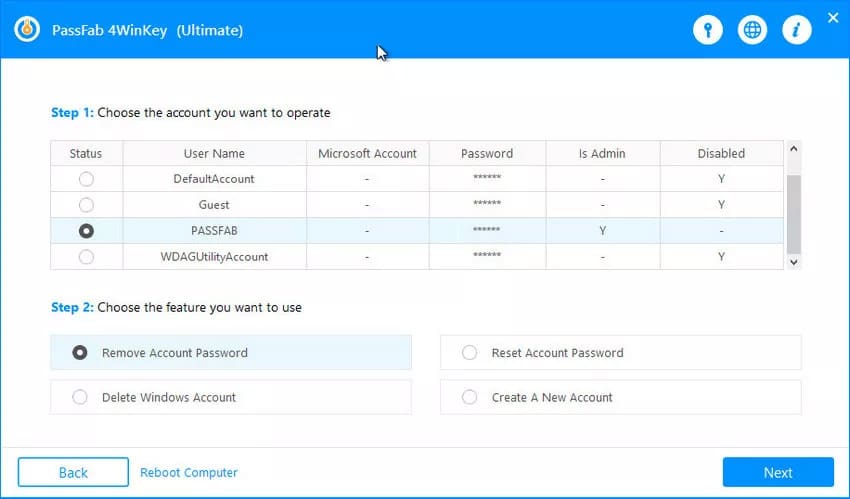
Step 7. In one case finished, PassFab will brandish a message: {Username] account password has been removed; please reboot the computer.
Click on the Reboot choice.
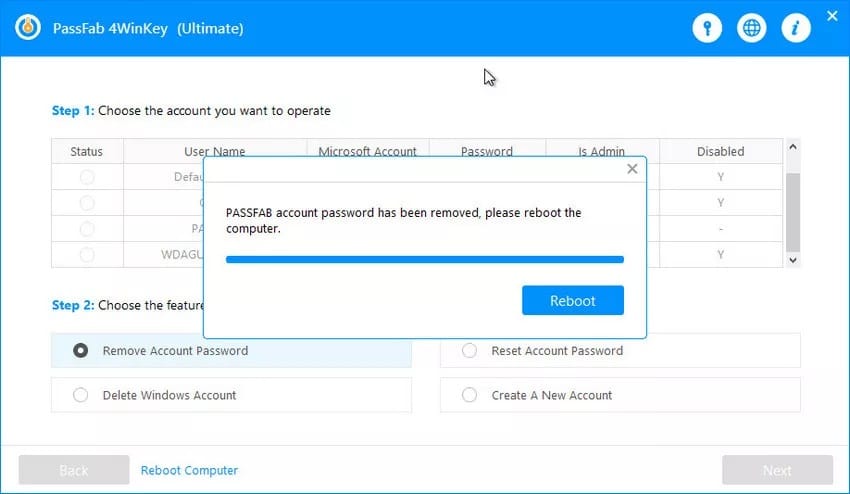
Step 8. After the Reboot, Windows 10 volition restart ordinarily, and at the lock screen, information technology will non request the password.
PassFab, equally you have seen, does not necessitate whatsoever special obligations like the pre-created password reset deejay and all the same enables y'all to remove the password and hack into Windows 10 without any difficulty.
Plus, the steps involved are non that troublesome, and you exercise not take to be tech-savvy to perform these simple commands. Learn more from our PassFab 4WinKey Review here.
Mode 4. Hack Windows ten/eleven Admin Password with Command Prompt (Installation Disk)
Installation disk is another savior that y'all tin utilize to hack the password of your Windows 10 laptop. Installation disk is nothing just the backup tool recommended past Microsoft for times like these.
While the installation is a necessary requirement for this hack to work — most of the work involved is washed via the control prompt.
Note: Equally apparent, you will need an installation disk for this hack to piece of work; if you do not have one — download using the Media creation tool. You tin can also employ someone else'south Installation media; however, ensure that they use the same Windows 10 edition (Dwelling house, Enterprise, etc.).
Follow these unproblematic instructions to learn how to hack Windows 10 password with the command prompt (i.e., install deejay):
Step i. Kicking via the Installation disk:
- Insert the installation media into the figurer that you lot want to hack.
- Restart the computer and boot via the inserted media, i.due east., press the hotkey — Esc, F12, F10, etc. — when the manufacturer'south logo appears to access the BIOS bill of fare. Then, from the boot menu, select the inserted media and bring it to the top using the pointer keys.
- Save and Exit, then restart the laptop.
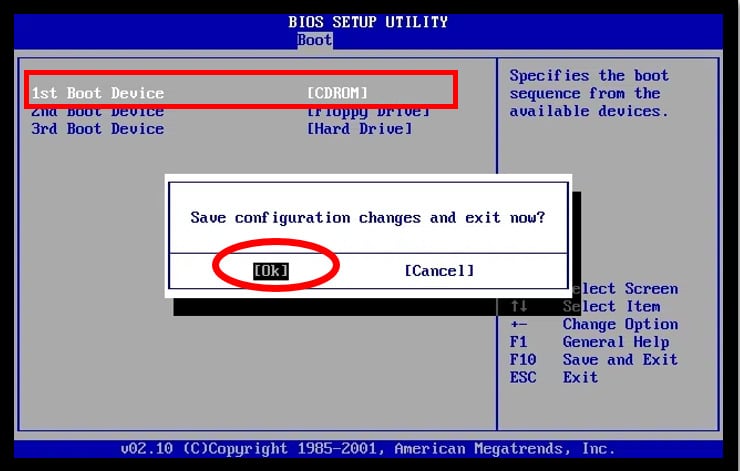
Read More than: How to Create a Bootable Disk in Windows 10
Step ii. Subsequently the restart, Windows will have some fourth dimension to prompt you to the installation setup with a bluish screen
After you run into the blue screen, press Shift+F10 keys at in one case to open up the Command Prompt. (Y'all do Not have to fill anything in the Windows Setup menu).
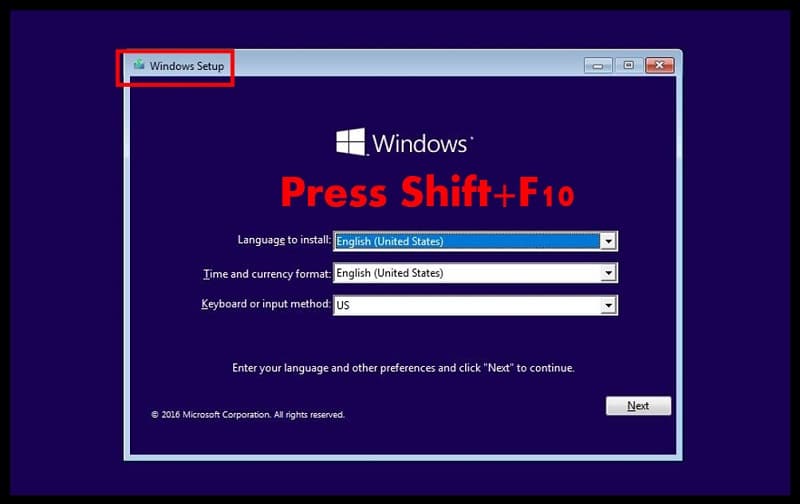
Read More: How to Kick to Control Prompt in Windows ten
Step 3. In the Control prompt, blazon in the post-obit commands:
movement d:\windows\system32\utilman.exe d:\windows\system32\utilman.exe.bak
Press Enter.
Yous will meet the confirmation saying: i file(southward) moved.
Now, type in this command:
copy d:\windows\system32\cmd.exe d:\windows\system32\utilman.exe
Press Enter.
Y'all will see the confirmation message: i file(s) copied.

Both of the above commands volition direct Windows to replace the Ease of Admission (also known as Utility Manager) at the lock screen.
Step four. Later y'all run across the message, type in the following command to straight Windows 10 to initiate an automated reboot.
wpeutil reboot
Notation: Equally before long as the reboot starts (screen goes night), remove the Installation media immediately. If you do not, Windows will boot via the Installation disk again.
Also, instead of typing the control to reboot, you lot tin can manually restart subsequently removing the Installation media first.
Step v. In one case the computer reboot normally,
From the lock screen, cull the Ease of Access center to open the Command Prompt window.
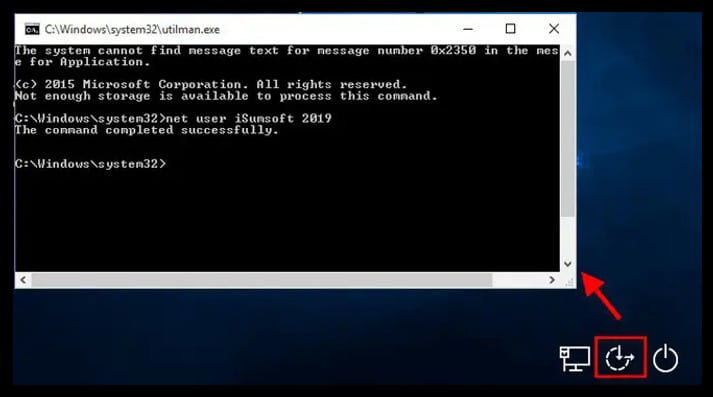
Alternatively, you can press the Shift key nigh five times to open information technology.
Step 6. In the command prompt, blazon in the following command:
net user USERNAME Countersign
Notation: In the above control, the USERNAME is the user account proper name (above the password box) that you want to hack, and instead of the Password — enter any desired characters.
For case, if the USERNAME is Sherlock and the desired PASSWORD is [email protected], and then the command will await similar this:
internet user Sherlock [email protected]
Step 7. Press Enter.
Yous will run across a bulletin displaying: The command completed successfully.
Footstep 8. Close the Command Prompt and type in the new countersign ( entered in the above control).
Annotation: In Step three, you have chosen to replace the Ease of Access menu with the command prompt. If you do non utilize it, then you can leave it like that.
However, if you want to supplant the utility center — follow these steps:
- Insert the installation media.
- Kick via the inserted disk (similar mentioned above).
- Press the Shift+10 primal on the installation setup screen.
- Type in the post-obit command in cmd:
move d:\utilman.exe d:\Windows\system32\utilman.exe- Press Enter.
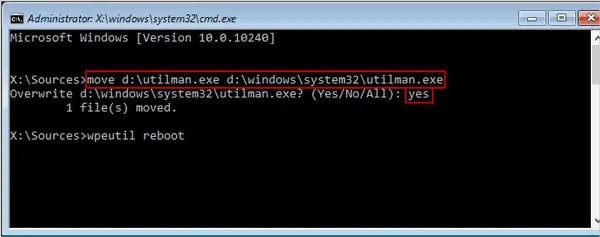
- Cmd volition ask permission to overwrite, type — Yes.
- Close the Cmd in one case you encounter: ane file(s) moved bulletin.
- Remove the installation disk.
- Restart the calculator.
That is it. Considerably troublesome than the other three ways of hacking the Windows 10 countersign but equally effective equally them.
And then, if you have the installation disk — do not hesitate to follow the steps and hack Windows ten password with the command prompt.
Conclusion
Resorting with the availability — Password Recovery tool, Installation deejay, or access to Microsoft Business relationship — choose any of the three means to hack Windows 10 password. All are equally efficient, and yous will not have any complications while hacking the locked laptop.
Notwithstanding, if you do non hold the higher up means, or for some reason, they do not work — employ WAY 3 to hack into Windows x.
Windows Password Recovery Software similar PassFab 4WinKey may be an unapproved solution, but it is an constructive one withal. You lot can use these software'southward—or at least PassFab — without whatsoever concern.
Important Note: Regardless of the method you use to hack Windows 10 admin password, once yous become yourself through the lock screen, practise not forget to:
- Create a Countersign Reset Deejay.
- Set the Security Questions (for 1803 version and later).
- Set up the sign-in via Microsoft Account.
To reset the Windows x password for quick recovery, and for the time being, if you practice not take any of the above to bypass the Windows x password — use PassFab 4WinKey.
Get PassFab 4WinKey Now
Source: https://www.wincope.com/how-to-hack-windows-10-admin-password.html
Posted by: myersreplach.blogspot.com
0 Response to "How To Hack Windows 10 Admin Password"
Post a Comment